Don't Issue a Tax Compliance PIN Three Weeks Before a South African Tender

A tax compliance PIN is a unique code SARS issues so a third party, like a tender evaluator, can verify your compliance status online without you handing over sensitive tax documents. You request it through eFiling's My Compliance Profile or the SARS Online Query System, and once issued, you share the PIN (not a certificate) with whoever needs to confirm you're in good standing.
*TL;DR:>
- The TCS PIN is a unique access code that verifies your SARS compliance status at the moment it is checked, not proof of passing.*
- Requests must be made via eFiling or SARS online tools, with a merged tax profile to avoid delays, and should be issued close to the verification date.
- Third-party verifiers need your tax reference number and the PIN to see your compliance status, which appears as a green or red indicator per tax type.
- Compliance status can change between PIN issuance and verification, so re-issuing shortly before submission is essential for tender readiness.
- Common issues delaying requests include unmerged tax types, overdue returns, unpaid debts, or missing documents, which require prompt resolution to ensure approval.
Table of Contents
- What is a tax compliance pin and what can third parties see with it?
- How to request a TCS PIN on eFiling (and via SOQS)
- How buyers verify your TCS PIN
- Why your PIN can expire before anyone checks it
- Why requests get delayed, declined, or sent for review
- Your pre-tender TCS checklist
- What tender practitioners get wrong about compliance timing
- Stay tender-ready with ProTenders
- Sources
- FAQ
What is a tax compliance pin and what can third parties see with it?
The Tax Compliance Status system replaced the old paper tax clearance certificate process, and the shift matters more than it sounds. Instead of a static document that ages the moment it's printed, TCS gives verifiers a live look at your standing whenever they check.
Here's the part that trips people up: the PIN itself doesn't prove anything. It's simply the access code. Compliance is only confirmed the moment someone uses that PIN to run a verification, and what they see is binary:
- Green means compliant across the tax types checked.
- Red means something is outstanding, whether a return, a payment, or a registration gap.
- Each TCS request generates its own unique PIN. You can't reuse one from a previous tender.
A "PIN issued" letter only confirms SARS processed your request, not that you passed.
How to request a TCS PIN on eFiling (and via SOQS)
Before you request anything, confirm three things: you're registered on eFiling, you have at least one activated tax type (Income Tax, VAT, or PAYE), and if you operate under multiple registrations, those entities are merged into one profile. Skipping that merge step is the single most common reason requests stall.
Once that's sorted, here's the eFiling path:
- Log in to eFiling and activate the Tax Compliance Status service on your profile if you haven't already.
- Open My Compliance Profile (MCP), your live dashboard showing compliance across every linked tax type.
- Select Tax Compliance Status Request and choose the correct type: Good Standing, Tender, Foreign Investment Allowance, or Emigration. Tenders specifically need the "Tender" type, not the general one.
- Submit the request. If your affairs are in order, SARS issues the PIN via SMS or email within minutes to a few hours.
- If you need to re-issue a PIN later (a tender deadline shifted, or the original PIN expired), return to the same TCS Request screen and generate a fresh one. It only takes a minute.
If you can't get into eFiling or need a quick standalone check, SARS runs a dedicated TCS request tool through its online query system. It's lighter than full eFiling and useful when you're requesting on someone else's behalf with limited access. Pro Tip: Request your PIN as close as possible to the actual submission or verification date. A PIN issued three weeks before a tender closes can technically still work, but if a return falls due in that window, your status could flip to red before anyone checks it.
How buyers verify your TCS PIN
A tender officer or procurement buyer doesn't need your login. They need two things from you: your tax reference number and the PIN. From there, they run the check themselves, either through eFiling or the SARS Online Query System.
What they see once they submit those two details:
- Your registered trading name, so they can match it against your tender submission.
- The tax types covered by the request (Income Tax, VAT, PAYE).
- A single compliance indicator, green or red, per tax type.
One detail worth flagging to procurement contacts you deal with often: they need TCS verification rights enabled on their own eFiling profile before they can run a New Verification Request. If a buyer says the PIN "isn't working," it's often their access that's misconfigured, not your compliance.
Why your PIN can expire before anyone checks it
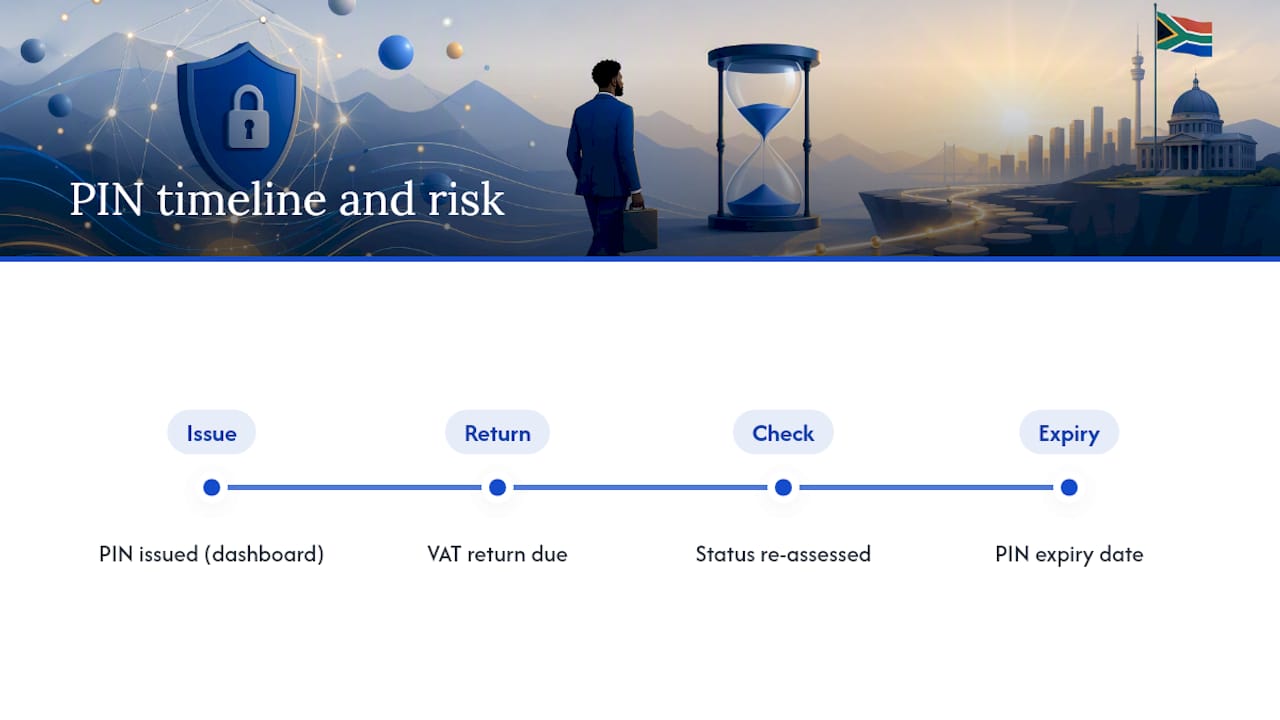
Every TCS request comes with its own issue date and expiry date, both visible on the request dashboard alongside the request status and reference number.

Here's the mechanic that catches SMMEs off guard: compliance isn't locked in at the moment you get your PIN. It's assessed fresh at the exact moment a verifier runs the check. You could be green on Monday and red on Friday if a VAT return falls due in between. For a tender with a verification date weeks out, that gap is real risk. If there's any chance your PIN will have expired, or your circumstances will have changed, by the time a buyer checks, request a new one closer to that date rather than trusting the original.
Why requests get delayed, declined, or sent for review
Most stuck requests come down to one of four things: unmerged tax types on your MCP, an outstanding return, unpaid debt, or missing supporting documents SARS hasn't received yet.
The fixes are usually mechanical rather than complicated:
- Unmerged entities. If VAT, PAYE, and Income Tax show as separate profiles instead of one consolidated view, merge them on eFiling and resubmit. This is the fix behind a large share of stalled requests.
- Outstanding returns. File whatever's overdue first. SARS won't issue a clean PIN around a gap in submissions.
- Unpaid debt. Arrange a payment plan if you can't settle in full. A plan in good standing is treated differently from silence.
- Missing documents. Requests can sit in "Awaiting Relevant Material" until you upload what's been asked for.
Understanding the status labels helps you know what to do next: Pending means it's still processing, Awaiting Relevant Material means SARS wants something from you, and Review in Progress means a case officer is looking at it manually, which can take longer. Pro Tip: Keep proof of payment arrangements and outstanding return confirmations saved before you submit a TCS request. If your case gets flagged for review, having documentation ready to upload immediately can shave days off the resolution time.
Your pre-tender TCS checklist
Before you submit any bid, run through this short list rather than assuming last month's compliance status still holds.
- Open MCP and confirm every relevant tax type shows green, not just Income Tax.
- Re-issue your PIN shortly before the tender closing date rather than relying on an older one.
- Check that your registered trading name matches exactly what's on your tender paperwork. A mismatch here causes more rejections than people expect.
- Build a compliance folder: PIN letters, payment plan confirmations, and any documents SARS has requested, all in one place.
- Assign one person in your business to own this process and check it on a schedule, not just when a deadline is looming.
A non-compliant status discovered during verification can mean immediate disqualification, regardless of how strong the rest of your bid is.
What tender practitioners get wrong about compliance timing
The pattern shows up constantly: a business submits a strong technical proposal, wins on merit, then loses the award because the PIN they attached had gone stale, or their trading name on eFiling didn't match the name on the bid documents. Neither failure has anything to do with the quality of the work. Both are entirely avoidable.
The businesses that don't run into this treat compliance as an ongoing operational task, not a once-off scramble before a deadline. Someone owns it. There's a checklist. PINs get re-issued close to submission, not weeks ahead. If you're serious about winning public sector work through ProTenders' tender search, build that discipline in before you need it, not after a red status costs you a contract.
— Dolene April
Stay tender-ready with ProTenders
Keeping your TCS current is only half the battle. Winning tenders also means finding the right opportunities before your competitors do, and having your compliance paperwork organised the moment a buyer asks for it. Protenders aggregates live tenders from national, provincial, and municipal buyers in one searchable feed, so you're not manually checking dozens of government sites while also tracking your PIN status.
Beyond search, Protenders gives you compliance scorecards and document templates that pair naturally with the PIN and MCP habits covered here, so your compliance folder and your bid documents stay in sync instead of scattered across email threads. If funding is the next hurdle once you win, Protenders also connects SMMEs with funding partners to help execute awarded contracts. Search live South African government tenders now and see what's closing this month.
FAQ
How do I get my tax compliance PIN?
Log in to eFiling, open My Compliance Profile, and submit a Tax Compliance Status Request choosing the "Tender" type if you're bidding on a contract. SARS sends the PIN by SMS or email once your affairs are in order, or you can use the SARS Online Query System if you don't have eFiling access.
What does a tax compliance PIN mean?
It's a unique code that lets a third party, such as a procurement officer, run a live check of your SARS compliance status without accessing your full tax records. The PIN itself confirms nothing; the verification result (green or red) at the time it's checked is what matters.
How can I download my SARS tax compliance certificate?
SARS no longer issues a standalone paper certificate. Instead, you generate a TCS PIN through eFiling's My Compliance Profile and share that PIN with whoever needs to verify your status.
How long is a tax compliance PIN valid?
Every PIN carries its own issue and expiry date visible on your request dashboard, but your actual compliance status can change before that expiry if a return or payment falls due. For tenders, re-issue a fresh PIN close to your submission or verification date rather than relying on an older one.